FROM FIRST LOOK TO FOLLOW-UP

Five outcomes. One continuous experience.

One Showcase brings the media, guidance and next step together—so every interaction can move somewhere useful.

SONO · PRODUCT INTERFACE01 / 05 · EXPLORE
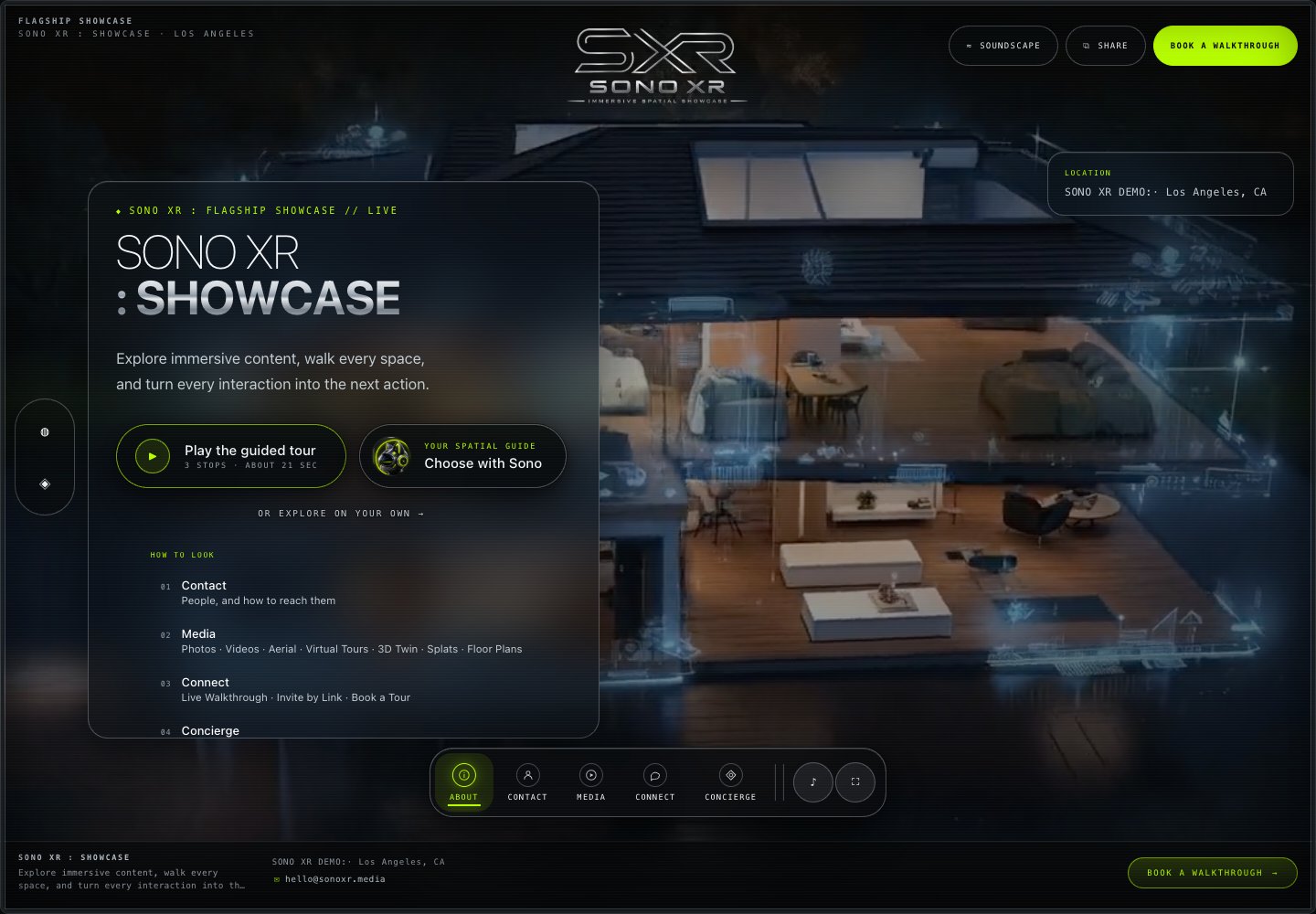
SONO Showcase interface with About, Contact, Media, Connect and Concierge navigation
Let people move through the space on their terms. LIVECore Showcase

ONE EXPERIENCE · FIVE OUTCOMES

Interest should move somewhere useful.

Select a stage to see the customer outcome, the working capability behind it and its current readiness.

SONO Showcase interface with About, Contact, Media, Connect and Concierge navigation01 / 05 · EXPLORE

IMMERSIVE MEDIA · LIVE

Let people move through the space on their terms.

Open a branded Showcase on any modern browser and move between virtual tours, photos, videos, plans, maps and supporting material without leaving the experience.
  • No app required
  • Web + mobile
  • One shareable link
LIVECore Showcase

THE CONTENT BEHIND THE JOURNEY

Use what already makes the space real.

Choose only the media and information that helps this audience. Core modules can be included, hidden or reordered; specialized formats can be scoped.

01

Immersive Media

Included
Virtual tours, photography, video, 3D, 360° and related media in one branded Showcase.

02

Guided Experiences

Optional
Guided playback supports narrated routes and timed highlights. Custom narration and creative production are optional studio services.

03

Property Information + Documents

Included
Plans, documents, location details and supporting information alongside the media.

04

Actions + Lead Capture

Included
Inquiries, contact routes and client-provided booking or checkout links. External scheduling and booking depend on configuration.

05

SONO Signals

Included
Visit, source, device and engagement context. Anonymous activity does not prove a sale.

06

Brand + Publishing

By plan
Client branding is included on every plan. Visitor-facing white-labeling is optional on Showcase, included with Portfolio and expanded across supported platform surfaces with Enterprise. Required attribution from embedded map, media, tour, data or third-party technology providers may remain visible.

07

Dashboard + Builder

Included
Use the authenticated dashboard and guided builder to add media, organize modules, update information and prepare the experience for review. Access is arranged during onboarding.

08

Portfolio + Scale

By plan
Portfolio manages standalone Showcases in one account. Enterprise connects 3–10 locations in one branded experience, with a full Showcase and direct link for each property. Setup is confirmed during onboarding; advanced organization controls are scoped.

09

Connect + Integrations

Scoped
Analytics configuration, automation and CRM handoffs matched to your existing workflow. Activation and implementation are confirmed by scope.

10

Displays

Optional
Touch and kiosk presentation with published Showcase content. Hardware, installation and custom device management are separate.


CORE CONTENT MODULESYOUR BRAND · YOUR ORDER · YOUR AUDIENCESPECIALIZED FORMATS SCOPED

SONO SIGNALS · VERIFIED ACTIVITY

See the trail. Keep the claim honest.

Core visit, source, device, engagement and lead activity is live. It can show what happened inside a Showcase; it does not claim to prove a sale or conversion on its own.

Observe the visit.
Recognize interest.
Follow up with context.
SIGNAL STREAM · LIVEILLUSTRATIVE INTERFACE · VERIFIED EVENT TYPES
01
SOURCEDirect Showcase link
02
ENGAGEMENTVirtual tour opened
03
INTERESTFloor plan revisited
04
ACTIONLead form submitted
VISIT → INTEREST → ACTIONCONTEXT FOR FOLLOW-UP ↗

CRM + WORKFLOW CONNECTIONS · AVAILABLE BY SCOPE

Interest shouldn’t stop at the Showcase.

SONO captures leads and verified engagement context, then helps move the useful details into the tools your team already uses—from inboxes and spreadsheets to HubSpot, Salesforce and other CRMs.

01 · CAPTURE SHOWCASE

Know what created the interest.

Collect the inquiry alongside useful context such as the Showcase, source, content and next step that brought the person forward.

02 · CONNECT WORKFLOW

Fit the workflow you already have.

CRM, webhook and export workflows can be scoped around the tools your team uses. Connection and activation requirements are confirmed for each project.

03 · CONTINUE TEAM

Give the team a better starting point.

Deliver the lead where your team already works so follow-up can begin with context instead of another round of data entry.

START WITH ONE SPACE

Let’s talk.

AVAILABLE TODAY

What you can put to work now.

  • Guided SONO Showcases with builder access, expert launch review and optional creative add-ons
  • SONO Displays for touchscreens, kiosks and connected spaces
See engagement signals →
START WITH ONE SPACE

Start with one space.

Build your first Showcase with guided tools, then launch with expert review. You control and approve the content; SONO supports the platform and the launch.

01Bring your story02Build with guided tools03Launch with expert review
EXPLORE THE PRODUCT

See how your media, information and next steps come together.

See How It Works →

YOUR PERSONAL WALKTHROUGH

Book a demo.

A personal walkthrough, shaped around your space and what your team needs.

  1. 01 Your details
  2. 02 Choose a time

See what’s possible.
For your space.

Bring your goals and questions. We’ll show you how SONO helps people explore your space, take the next step and stay connected throughout their visit.

WHAT WE’LL COVER

  1. Explore a real Showcase

    See how virtual tours, photos, plans and key details come together, with a clear path to inquire or book.

  2. Make it your own

    Walk through the guided builder, branding and content options, plus Concierge Build if you want us to assemble it.

  3. Connect the whole visit

    Explore how a Showcase can extend into a Visitor App and Lobby Hub for your team and guests.

  4. Find your starting point

    Talk through your spaces, platform plans, optional add-ons and what you need to launch.

START WITH YOUR SPACE

Your space. Your walkthrough.

A few details help us make the most of our time together.

Fields marked * are required.

Next, choose a time and confirm your booking. Privacy policy ↗